Search progress window
After you press play, NeNeTeePee-Stream-Kodi shows a window that follows the search step by step until the release list opens. It replaces the small busy indicator earlier versions showed in the corner, so a slow indexer no longer looks like a frozen screen.
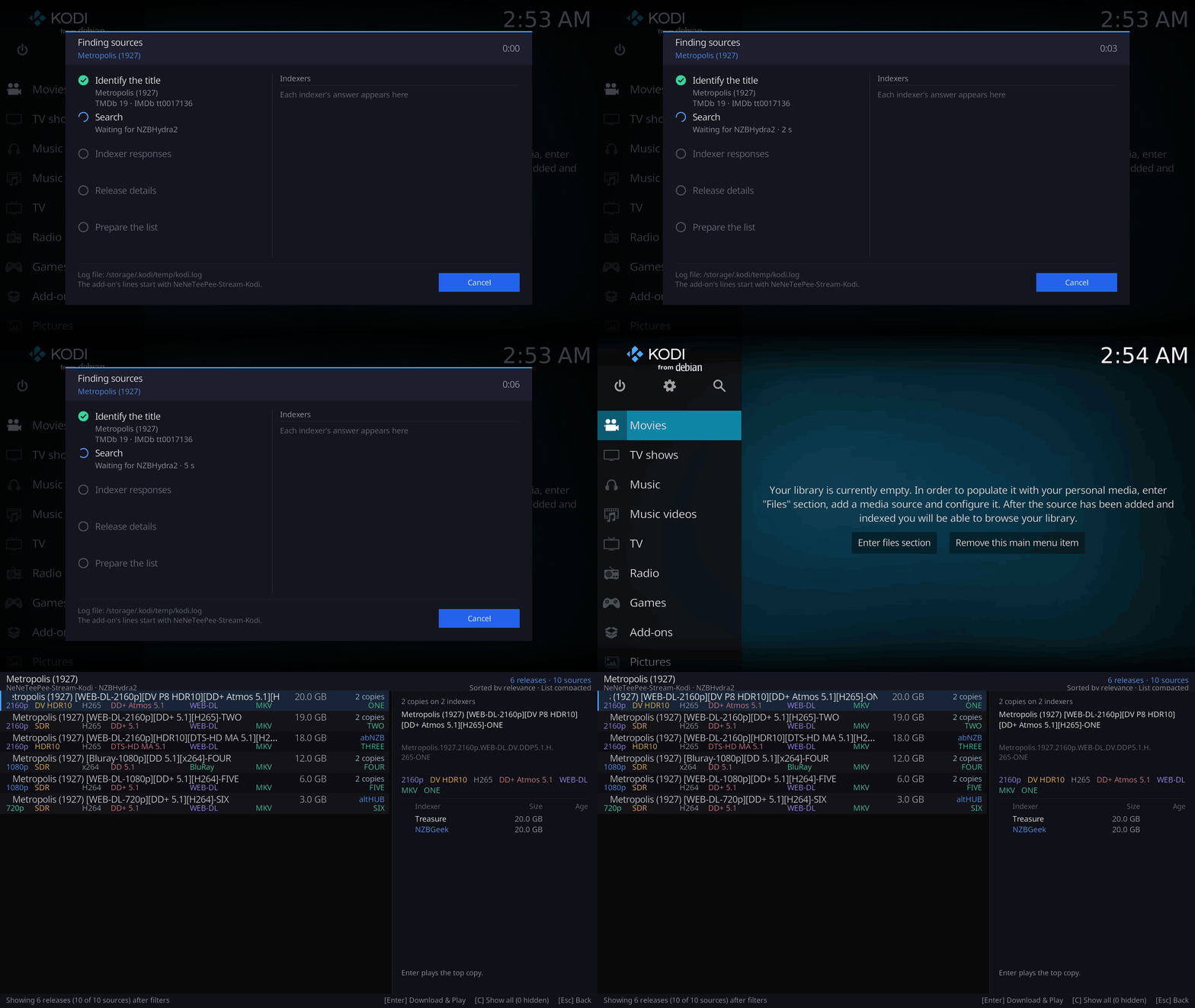
Recorded in a test Kodi against a stand-in NZBHydra2 with two failing indexers and three that offer NFO or MediaInfo details.
How a search moves through the stages
flowchart TD
    play([Press play]) --> id[Identify the title<br/>title, season, episode, IDs]
    id --> search[Search<br/>NZBHydra2, Prowlarr or direct indexers]
    search --> idx[Indexer responses<br/>results, times, failures]
    idx --> details[Release details<br/>NFO and MediaInfo of the top releases]
    details --> prepare[Prepare the list<br/>filter, sort, check downloads]
    prepare --> picker([Release list])
    id -. Cancel .-> stop([Stops quietly])
    search -. Cancel .-> stop
    details -. turned off or nothing new .-> prepare
    prepare -. Auto-select on .-> playbest([Plays the best match])

    classDef stage fill:#151520,stroke:#4A9EFF,color:#FFFFFF
    classDef endpoint fill:#1E1E2E,stroke:#34D399,color:#FFFFFF
    classDef halt fill:#1E1E2E,stroke:#FBBF24,color:#FFFFFF
    class id,search,idx,details,prepare stage
    class play,picker,playbest endpoint
    class stop halt
The colors match the window: blue for a stage in hand, green for the start and the finish, amber for a stop.
What each stage shows
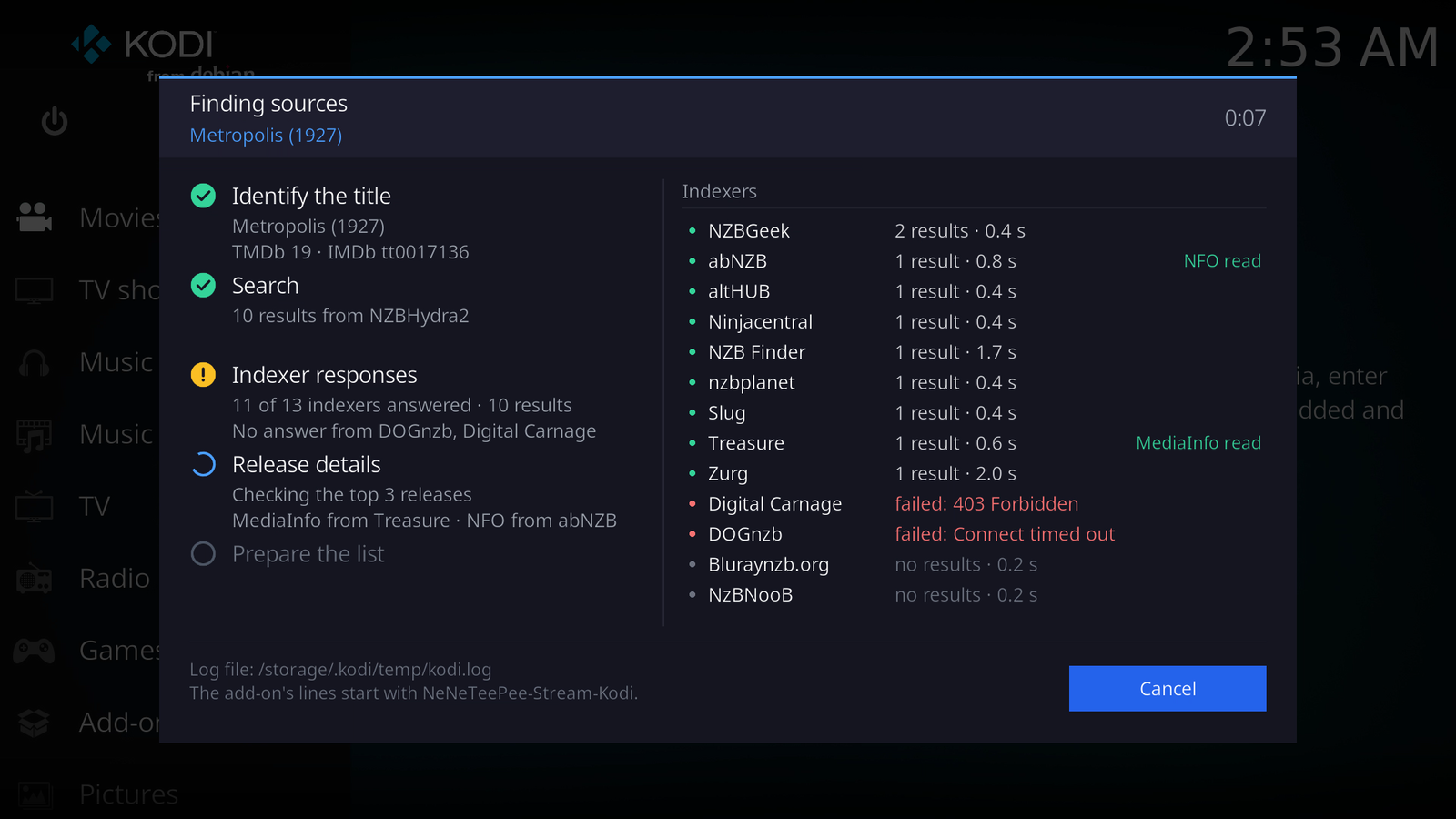
The left side lists five stages. A spinning ring marks the stage in hand, a green check a finished one, an amber mark a stage that finished with a problem, and a grey dash a stage that was skipped. After two seconds the stage in hand also shows how long it has been running.
| Stage | What it says |
|---|---|
| Identify the title | The film and year, or the show with its season and episode, and the TMDb, TVDB and IMDb IDs the player sent. An ID the add-on looked up itself (for example the TVDB ID of a show) is marked looked up. With no IDs, the search uses the title. |
| Search | Which provider it is waiting for (NZBHydra2, Prowlarr or direct indexers). When the ID search finds nothing and the add-on tries the title, it says so. At the end: how many results came back and from which provider, or why the search failed. Results reused from the search cache say how long ago they were saved. |
| Indexer responses | How many indexers answered and how many results they returned, and which ones did not answer. |
| Release details | Which indexers are asked for the NFO or MediaInfo of the top releases, and which supplied it. An indexer still busy when the short wait ends is named; its answer is kept for the next search. See Audio from the NFO. |
| Prepare the list | Filtering and sorting, the check for releases already downloaded, and how many results match your filters before the list opens. With Auto-select best match on, it says the best match is being played. |
The indexer table
The right side lists every indexer that took part, one line each:
- a green dot and the result count with the time the indexer took to answer;
- a red dot and the reason when an indexer failed, for example
failed: 403 Forbiddenorfailed: Connect timed out; - a grey dot for an indexer that answered with no results.
When the add-on read release details from an indexer, the last column says what came of it: MediaInfo read, NFO read, NFO: nothing new, NFO refused, or failed.
Where the indexer lines come from
- Direct indexers: each indexer reports as soon as it answers, so the table fills in while the search runs. A slow indexer shows searching… until it answers or times out.
- NZBHydra2: Hydra's search answer lists the merged results only, not which indexers it asked. Right after the search, the add-on reads Hydra's own record of that search from its search history: two small requests to your Hydra, none to any indexer, and only while this window is showing. The search waits at most 1.5 seconds for that record, so a slow Hydra never delays the release list. This needs Keep history on in Hydra's main settings (on by default). If Hydra's web interface requires a sign-in, or the history is off, the table instead lists the indexers named in the results, with their result counts, and the failures are not shown.
- Prowlarr: the table lists the indexers named in the results.
Cancel
Press Cancel or Back to stop. The window closes at once. A request already sent to your search provider is not interrupted; when it returns, the add-on stops quietly without opening the list or downloading anything.
The log file
The bottom of the window shows where Kodi writes its log on your device (for
example /storage/.kodi/temp/kodi.log on CoreELEC) and the prefix of the
add-on's lines. Each stage change is also written to the log as a line such as:
NeNeTeePee-Stream-Kodi: Search progress: Indexer responses [warn] 11 of 13 indexers answered · 10 results | No answer from DOGnzb, Digital Carnage
An NZBHydra2 indexer that failed gets its own line with the reason. See Troubleshooting for reading the log.
Turning it off
Turn off Sorting › Search Progress › Show search progress window
(search_progress_window) to show only Kodi's small indicator in the top-right
corner. It now names the stage in hand instead of a fixed message:

The corner indicator is also used when a skin or Kodi build will not open the add-on's window. Either way the search itself is the same.