Connect NZBGet
Current source and next release
The unified Playback backend section and StreamNZB support are not in Stable 1.2.3 or Beta 2.0.0-beta.2. These instructions and screenshots describe current source builds and the next release.
In released builds, configure nzbdav and WebDAV under Connection. Beta 2.0.0-beta.2 has a separate NZBGet section with an Use NZBGet instead of nzbdav for playback toggle. Stable 1.2.3 supports nzbdav only. StreamNZB requires a current source build until a release includes it.
Use NZBGet for server installation and configuration instructions. Start with a running server that Kodi can reach.
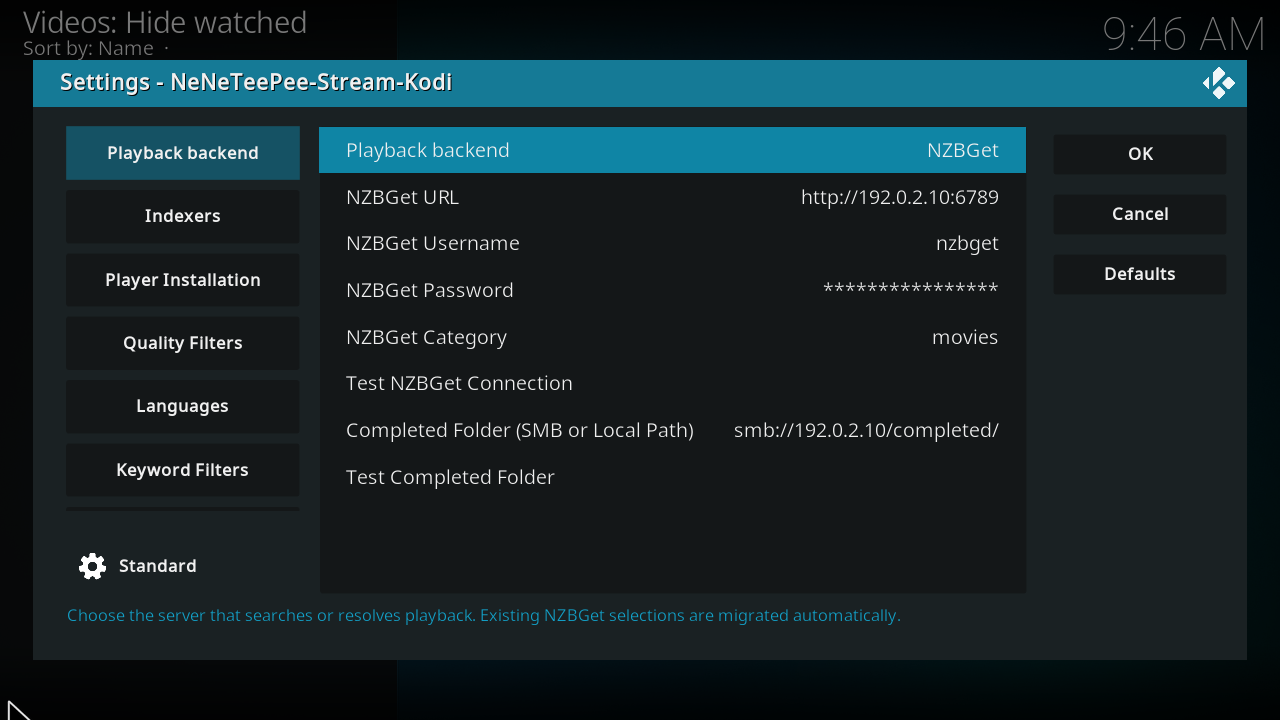
This is a real Kodi screenshot from the captured origin/main build, using example values. See the complete Playback backend settings for every option and commit-pinned source footnotes.
Configure the add-on
- Open Playback backend in the add-on settings.
- Select NZBGet.
- Enter the NZBGet URL, control username, and control password.
- Enter a category if your server requires one.
- Select Test NZBGet Connection.
- Enter the completed folder as Kodi sees it. Use a mounted local path or an SMB URL.
- Select Test Completed Folder.
- Configure a search provider on Indexers.
- Save the settings and select a title through TMDBHelper.
The completed folder must expose the files that NZBGet downloads. A path inside the server or its container might differ from the path Kodi can read.
The add-on waits for downloading and processing to finish, then plays the completed video. This backend does not use WebDAV or the local streaming proxy. See NZBGet playback and download recovery for completed-folder mapping and Smart Duplicates behavior.
Optional recovery fork
The xbmc4lyfe fork and Debian package work and NZBGet recovery proposal #850 are separate from the maintained NZBGet project. Follow the fork's build and package instructions if you choose it. Selecting NZBGet in Kodi neither installs the fork nor enables its server recovery features.