Connect nzbdav or InfiniDysk
Current source and next release
The unified Playback backend section and StreamNZB support are not in Stable 1.2.3 or Beta 2.0.0-beta.2. These instructions and screenshots describe current source builds and the next release.
In released builds, configure nzbdav and WebDAV under Connection. Beta 2.0.0-beta.2 has a separate NZBGet section with an Use NZBGet instead of nzbdav for playback toggle. Stable 1.2.3 supports nzbdav only. StreamNZB requires a current source build until a release includes it.
Use nzbdav or InfiniDysk for server installation and configuration instructions. Start with a running server that Kodi can reach.
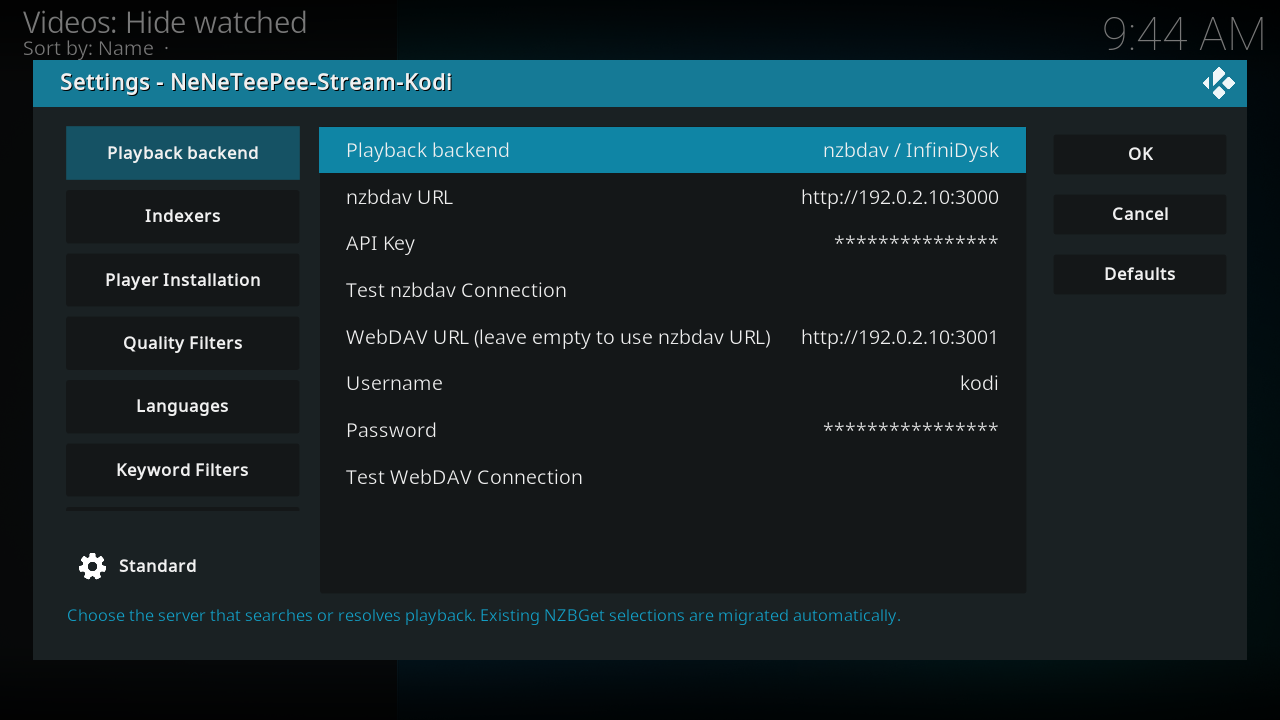
This is a real Kodi screenshot from the captured origin/main build, using example values. See the complete Playback backend settings for every option and commit-pinned source footnotes.
Configure the add-on
- Open Playback backend in the add-on settings.
- Select nzbdav / InfiniDysk.
- Enter the server URL and API key in the nzbdav fields.
- Select Test nzbdav Connection.
- Enter your WebDAV username and password.
- Clear WebDAV URL to reuse the nzbdav address. If WebDAV uses a separate address, enter that address instead.
- Select Test WebDAV Connection.
- Configure a search provider on Indexers.
- Save the settings and select a title through TMDBHelper.
The add-on submits the selected NZB, checks for an available video over WebDAV, and hands playback to its local proxy. The proxy supports seeking through HTTP Range requests. Remuxing requires optional ffmpeg support. See playback and fallback streams for their settings and limits.