Set up the TMDB API key
The optional TMDB API key (optional, movies and TV) field helps the add-on search by the identifiers an indexer accepts. It converts a TMDB movie ID to an IMDb ID and a TMDB TV series ID to a TVDB ID when the player has not already supplied that identifier. It is not a Usenet provider key or a TVDB API key.1
Get a key
- Create or sign in to your TMDB account.
- Open your account Settings → API and request a developer API key. Follow TMDB's application instructions. TMDB documents this route in its API FAQ.
- Copy the API Key, often described as the API v3 key. The add-on expects this key, not the longer API Read Access Token.
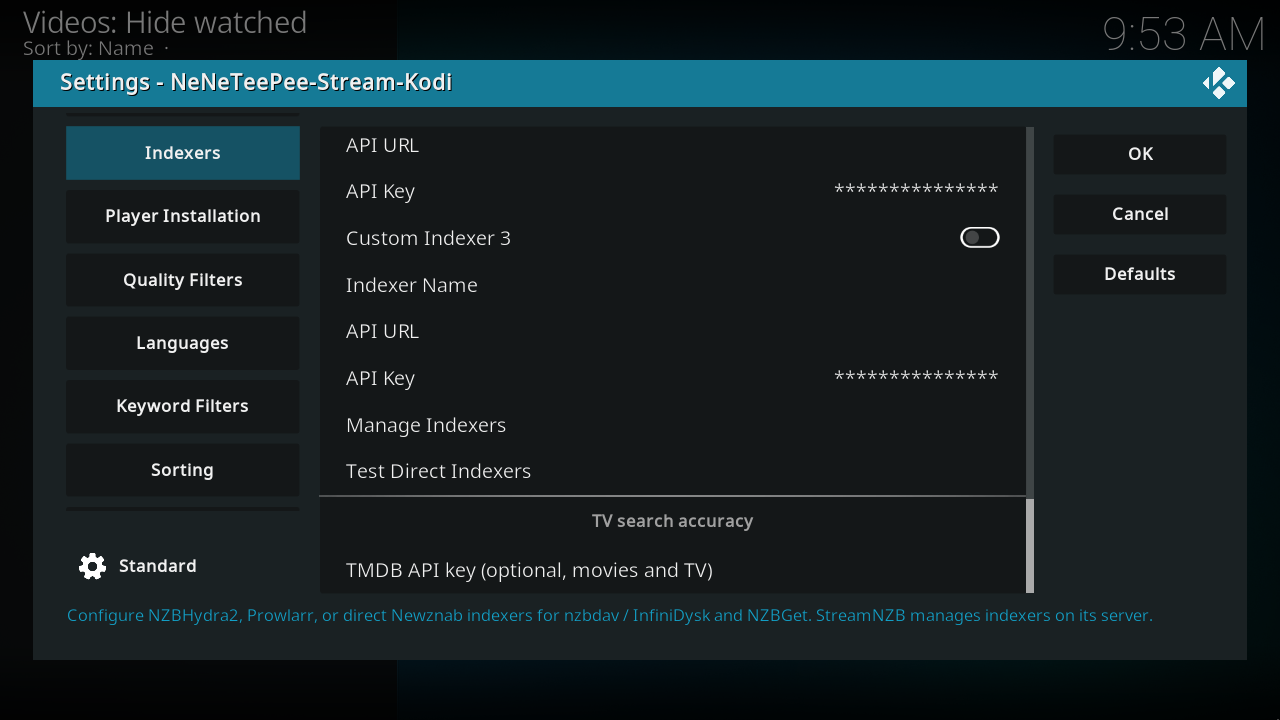
- Open NeNeTeePee-Stream-Kodi → Configure → Indexers. Scroll to TV search accuracy and paste the key into TMDB API key (optional, movies and TV).
- Select OK to save. See phone copy and paste for an easier way to enter it.
What happens without a key
The add-on still uses identifiers supplied by TMDBHelper. When conversion is unavailable or a lookup fails, it falls back to the supplied IDs or title text. A key improves identity matching; it does not guarantee that an indexer has a matching release. StreamNZB owns its own metadata and search configuration, so this local field does not configure its server.1
TMDBHelper is a separate add-on. Any API configuration in its own settings belongs to TMDBHelper, not this field. Install and connect TMDBHelper to browse titles and launch this player.
-
TMDB setting and help at the captured commit. See the per-setting runtime reference for the lookup implementation. ↩↩